GATE 2015 COMPUTER SCIENCE & INFORMATION TECH. – CS – C Programming | Q. 34 (Session – 1)
void f1(int a, int b) {
    int c;
    c=a; a=b; b=c;
}

void f2(int *a,
         int *b) {
    int c;
    c=*a; *a=*b; *b=c;
}

int main() {
    int a=4, b=5, c=6;
    f1(a,b);
    f2(&b, &c);
    printf("%d",c-a-b);
}
Solution
Remember below concept: Call by Value and Call by Reference
Call by Value and Call by Reference
A simple way to understand these two concepts is to imagine a classroom and a student’s marks record.
🟢 Call by Value – Give a Copy
Imagine a teacher gives a student a photocopy of the marks record. The student changes the photocopy from 80 to 100.
The teacher’s original record is still 80.
Simple rule:
“I give you a copy. You can change your copy,
but my original does not change.”
🔵 Call by Reference – Access the Original
Now imagine that the teacher gives the student access to the original marks record. If the student changes the marks from 80 to 100, the original record also becomes 100.
Simple rule:
“I give you access to the original.
If you change it, my original changes too.”
Quick Comparison
| Call by Value | Call by Reference |
|---|---|
| A copy is passed. | Access to the original is provided. |
| Changing the copy does not change the original. | Changing the original changes the caller’s value. |
🟢 Call by Value → Copy
🔵 Call by Reference → Original
main()
int a = 4,
    b = 5,
    c = 6;
a = 4,
b = 5, and
c = 6.
Variables a, b, c are local to main() function. They are local variables of main() function.
f1(a, b)?
void f1(int a, int b) {
    int c;
    c = a;
    a = b;
    b = c;
}
f1(a, b);
a
and
b
are passed by value.
f1()
gets copies of
main()‘s
a and
b. As they are photocopies, f1() can’t change local variables of main() function.
f1().
a = 4, b = 5

c = a;   → c = 4
a = b;   → a = 5
b = c;   → b = 4
f1():
f1().
Note that f1() can’t change the original variables – a, b of
main()
because a, b are passed by value.
f1()
finishes,
main()
still has:
a = 4
b = 5
c = 6
f1()
has no effect on the variables
a and
b in
main().
f2(&b, &c)?
f2(&b, &c);
&
operator. & is the address of operator. IT RETURNS ADDRESS OF A VARIABLE. &b returns address of b and &c returns address of c.
&b
means the
address of b,
while
&c
means the
address of c.
void f2(int *a,
        int *b)
main():
a = 4
b = 5
c = 6
f2().
c = *a;
*a = *b;
*b = c;
a points to
b and
b points to
c,
*a represents the value of b,
while *b represents the value of c.
c = *a;    → c = 5
*a = *b;   → b = 6
*b = c;    → c = 5
f1(),
f2() receives addresses.
Therefore, changing
*a and
*b
changes the original variables in
main().
printf()
printf("%d", c-a-b);
c - a - b
= 5 - 4 - 6
5 - 4 = 1
1 - 6 = -5
Output = -5
f1(a,b)
    → Pass by value
    → changes do NOT affect main()

f2(&b,&c)
    → Pass addresses
    → changes DO affect main()
f2(),
the values being passed are addresses.
Suppose we have:
/* statements */
}
int main() {
f1();
}
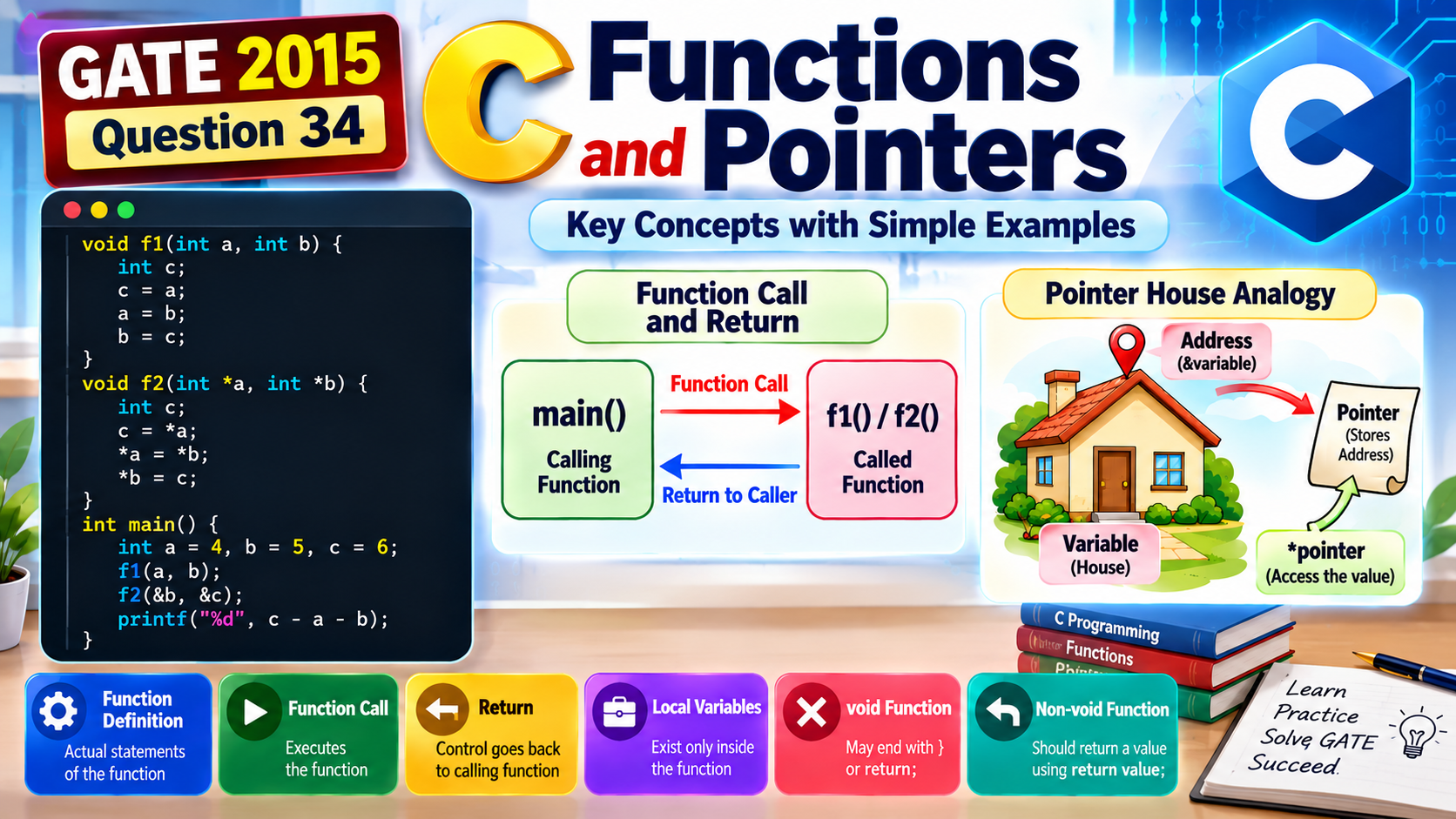
Here, main() calls f1().
In the above example, main() is the calling function.
📌 Called function: The function that is called.
Here, f1() is the called function.
A simple way to remember:
The function definition contains the actual statements that the function executes.
int c;
c = a;
a = b;
b = c;
}
Here, the complete block beginning with void f1(int a, int b) and ending with } is the function definition.
This statement tells the program to execute the function f1() by supplying the values of a and b.
f1(a,b) in This Question?
The statement
is actually executed. Therefore, we should not say that the function itself is ignored.
However, f1() receives copies of a and b because they are passed by value. Therefore, any changes made to its local a and b do not change main()‘s variables.
f1(a,b) on the variables in
main() is zero.
Therefore, its effect on the final calculation can be ignored.
But remember: the function is still called and executed.
Variables declared inside a function are generally called local variables of that function.
int x = 10;
int y = 20;
}
Here, x and y are local variables of f1().
So, for beginner-level questions, you can remember:
Consider a void function:
printf(“Hello”);
}
When execution reaches the closing brace }, the function reaches the end of its body.
For example:
f1();
printf(“World”);
}
After f1() reaches its closing }, execution continues with:
void Function
A function declared with void does not return a value to its caller.
It can finish in either of these ways:
printf(“Hello”);
}
void f2() {
printf(“Hello”);
return;
}
In the first function, reaching } ends the function. In the second function, the return; statement ends the function immediately.
return; in a void function means
return control without returning a value.
If a function is declared with a return type such as int, float, or char, it is expected to return a value of the appropriate type.
return a + b;
}
Here:
return a + b; → sends the calculated integer back to the calling function.
For example:
result = add(10, 20);
The value returned by add() is stored in result.
return value; to return a value to its caller.
Do not assume that every function can simply reach } without returning a value.
For a non-void function such as an int function, if execution reaches the closing } without producing a required return value, the behavior is generally undefined if the caller uses the function’s result.
void function → may end by reaching
}
or by executing return;.
Non-void function → should return an appropriate value using
return value;.
A very simple way to understand pointers is to imagine a real-life house.
For example:
int *p = &b;
Think of it like this:
📍 &b = the address of the house
📝 p = a pointer containing that address
🚪 *p = access the value inside that house
Since p contains the address of b, writing:
means: go to the house whose address is stored in p and change the value inside it to 10.
Variable = 🏠 House | Address = 📍 Location | Pointer = 📝 Stores the address | *pointer = 🚪 Access the value
Here, &b and &c are the addresses of the two variables.
Therefore, f2() receives the locations of the original variables in main(), rather than merely receiving copies of their values.
*a = *b; inside
f2() can directly change the variables belonging to
main().
🔹 Called function → the function being called.
🔹 Function definition → contains the statements executed by the function.
🔹 Function call → tells the program to execute another function.
🔹 void function → does not return a value.
🔹 return; → ends a void function and returns control to its caller.
🔹 Reaching } → normally ends the function and returns control to its caller.
🔹 Non-void function → should return an appropriate value using
return value;.
🔹 Local variables → their lifetime ends when their function execution ends (for ordinary automatic local variables).
🔹 Pointer → think of a 🏠 HOUSE; the pointer stores the house’s address.
🔹 &variable → address of the variable.
🔹 *pointer → access the value at the address stored in the pointer.