GATE 2015 COMPUTER SCIENCE & INFORMATION TECH. – CS – C Programming | Q. 11 (Session – 3)
#include <stdio.h>

int main()
{
    char s1[7] = "1234", *p;
    p = s1 + 2;
    *p = '0';
    printf("%s", s1);
}
Solution
🔹 Understanding the Character Array s1[7]
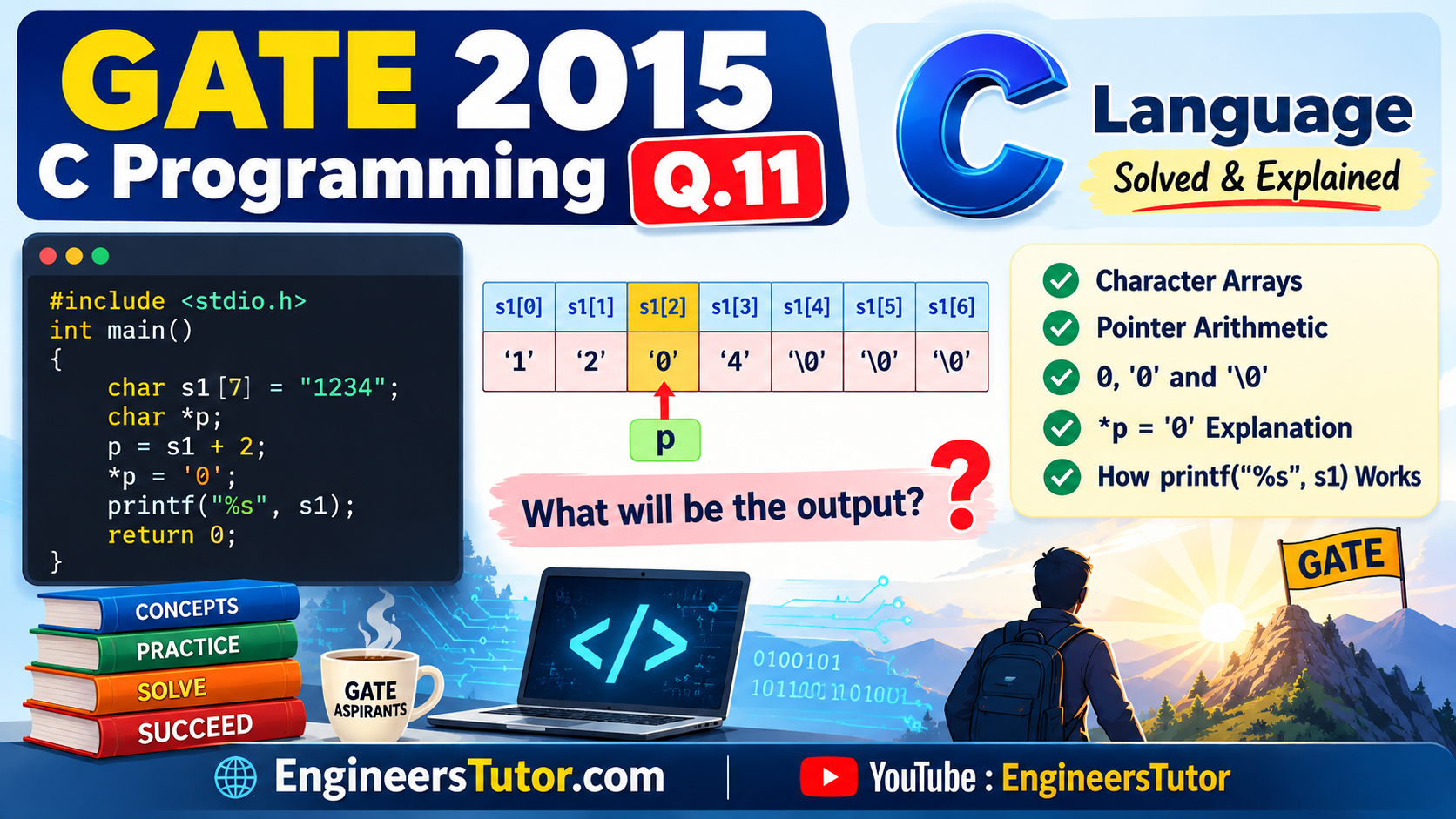
The statement char s1[7] = “1234”; declares a one-dimensional character array named s1.
Since the array size is 7, it contains 7 character elements, from s1[0] to s1[6].
The string “1234” contains four characters. A string also needs a terminating ‘\0’ character. Therefore, the first five elements contain ‘1’, ‘2’, ‘3’, ‘4’ and ‘\0’.
| Array Element | Stored Character |
|---|---|
| s1[0] | ‘1’ |
| s1[1] | ‘2’ |
| s1[2] | ‘3’ |
| s1[3] | ‘4’ |
| s1[4] | ‘\0’ |
| s1[5] | ‘\0’ |
| s1[6] | ‘\0’ |
The array has space for 7 elements, but the initializer “1234” provides only four characters plus the terminating ‘\0’. The remaining elements of a partially initialized array are automatically initialized to zero. For a character array, a zero value is represented by ‘\0’.
s1 is the name of the character array. When the array name is used in an expression, it generally converts to the address of its first element. Thus, in this case, s1 refers to the address of s1[0], which contains ‘1’.
So, for understanding the program, we can think of s1 as pointing to the first character ‘1’. However, strictly speaking, s1 is an array name, not a pointer variable.
NOTE NOTE NOTE NOTE NOTE NOTE
Here, the array has space for 7 elements, but the initializer provides values for only some of the elements. The remaining elements are automatically initialized to zero.
For a character array, a zero value is represented by ‘\0’.
Let us understand this rule with two simple examples.
The array has 5 elements, but only the first two elements are initialized. Therefore, the remaining elements are automatically initialized to 0.
| Array Element | Value |
|---|---|
| a[0] | 1 |
| a[1] | 2 |
| a[2] | 0 |
| a[3] | 0 |
| a[4] | 0 |
The array has 5 elements, but only the first two elements are initialized. The remaining elements are automatically initialized to zero. For a character array, zero is represented by ‘\0’.
| Array Element | Stored Character |
|---|---|
| a[0] | ‘A’ |
| a[1] | ‘B’ |
| a[2] | ‘\0’ |
| a[3] | ‘\0’ |
| a[4] | ‘\0’ |
🔍 Difference Between 0, ‘0’ and ‘\0’
In C, 0, ‘0’ and ‘\0’ are three different things. Understanding this difference is important when working with character arrays and strings.
#include <stdio.h>

int main()
{
    printf("%d\n", 0);
    printf("%d\n", '0');
    printf("%d\n", '\0');

    return 0;
}
48
0
| Expression | Meaning | Value |
|---|---|---|
| 0 | Integer zero | 0 |
| ‘0’ | Character zero. Its character code in ASCII is 48. | 48 |
| ‘\0’ | Null character. Its value is zero. | 0 |
0 is a number, ‘0’ is the character zero, whereas ‘\0’ is the null character.
Notice that ‘0’ and ‘\0’ are not the same. In ASCII, ‘0’ has the value 48, while ‘\0’ has the value 0.
The ‘\0’ character is especially important for strings because functions such as printf(“%s”, …) use it to identify the end of a string.
🔹 Understanding p = s1 + 2 and *p = ‘0’
First, consider the statement:
We already know that s1 represents the address of the first element of the array, s1[0].
Therefore, s1 + 2 means moving 2 character positions forward from s1[0].
So, s1 + 2 gives the address of s1[2]. The pointer p is therefore made to point to s1[2].
‘1’ s1[1]
‘2’ s1[2]
‘3’
↑ p s1[3]
‘4’ s1[4]
‘\0’ s1[5]
‘\0’ s1[6]
‘\0’
Now consider the next statement:
The * operator dereferences the pointer. In simple terms, *p means the value stored at the memory location to which p points.
Since p points to s1[2], *p refers to s1[2].
Therefore, *p = ‘0’; changes the value of s1[2] from ‘3’ to ‘0’.
After executing p = s1 + 2; and *p = ‘0’;, the array becomes:
| Array Element | Stored Character |
|---|---|
| s1[0] | ‘1’ |
| s1[1] | ‘2’ |
| s1[2] | ‘0’ |
| s1[3] | ‘4’ |
| s1[4] | ‘\0’ |
| s1[5] | ‘\0’ |
| s1[6] | ‘\0’ |
🔹 Understanding printf(“%s”, s1);
The statement
uses printf() to display the contents of the character array s1.
%s is the format specifier used by printf() to print a string.
When %s is used, printf() starts reading characters from the address supplied as the corresponding argument and continues until it encounters the null character ‘\0’.
After executing the statements p = s1 + 2; and *p = ‘0’;, the array contains:
| Element | Character |
|---|---|
| s1[0] | ‘1’ |
| s1[1] | ‘2’ |
| s1[2] | ‘0’ |
| s1[3] | ‘4’ |
| s1[4] | ‘\0’ |
| s1[5] | ‘\0’ |
| s1[6] | ‘\0’ |
printf() starts from s1[0] and prints:
When printf() reaches ‘\0’ at s1[4], it stops printing. Therefore, s1[5] and s1[6] are not printed.
The character stored in s1[2] is ‘0’ (character zero), not ‘\0’ (null character).
Therefore, ‘0’ is printed as an ordinary character. The ‘\0’ at s1[4] is what tells printf(“%s”, s1) to stop.
Hence, the program prints 1204. The correct option is (C) 1204.