Python if-else Statement – Simple Explanation with Examples
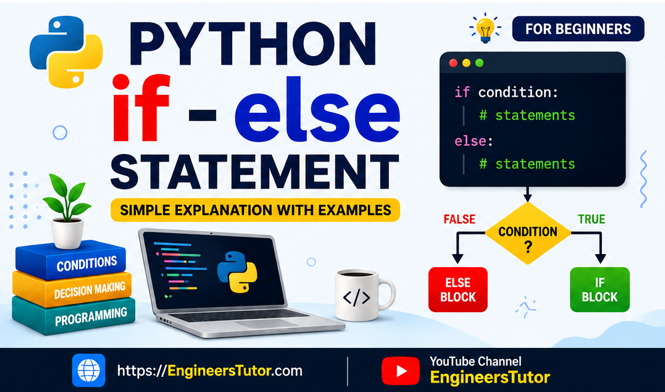
The if-else statement is used in Python to make decisions in a program. It allows a program to choose between two different actions depending on whether a condition is True or False.
For example, suppose we want to check whether a student has passed an examination. If the marks are greater than or equal to 40, we can display “Pass”. Otherwise, we can display “Fail”.
What is an if-else Statement?
The if statement checks a condition.
- If the condition is True, the statements inside the
ifblock are executed. - If the condition is False, the statements inside the
elseblock are executed.
The basic syntax is:
if condition:
    statement1
    statement2
else:
    statement3
    statement4
Notice that Python uses a colon (:) after if and else.
Also, Python uses indentation to identify which statements belong to the if or else block. Unlike C and C++, Python does not require curly braces { } for this purpose.
Simple Example
x = 10

if x > 5:
    print("x is greater than 5")
else:
    print("x is not greater than 5")
Output
x is greater than 5Here, x contains 10. Since 10 > 5 is True, the statement inside the if block is executed. The else block is skipped.
How Does if-else Work?
The execution of an if-else statement can be understood in three simple steps:
- Python evaluates the condition.
- If the condition is
True, theifblock runs. - If the condition is
False, theelseblock runs.
Only one of the two blocks is executed.
Example Using Two Variables
Consider the following program:
x = 5
y = 10

if x + y > 30:
    print("Stephen Hawking")
    print("Cosmology")
else:
    print("Albert Einstein")
    print("Physics")
First, Python calculates:
x + y = 5 + 10 = 15Then it checks:
15 > 30This condition is False, so the else block is executed.
Output
Albert Einstein
Physics
This example also demonstrates an important Python concept: multiple statements can belong to the same block simply by giving them the same indentation.
Indentation in Python
Indentation is very important in Python.
For example:
if x > 0:
    print("Positive")
    print("Number checked")
Both print() statements are indented, so Python considers both statements to be part of the if block.
In C or C++, curly braces are commonly used:
if (condition) {
    statement1;
    statement2;
}
Python achieves the same grouping using indentation:
if condition:
    statement1
    statement2
A common convention is to use four spaces for each level of indentation.
Relational Operators with if-else
Conditions often use relational operators such as:
| Operator | Meaning |
| = = | Equal to |
| != | Not equal to |
| < | Less than |
| <= | Less than or equal to |
| > | Greater than |
| >= | Greater than or equal to |
For example:
marks = 75

if marks >= 40:
    print("Pass")
else:
    print("Fail")
Since 75 >= 40 is True, the output is:
Pass= and == Are Different
Beginners often confuse = and ==.
= is used for assignment:
x = 10It means that the value 10 is assigned to x.
== is used for comparison:
x == 10It checks whether the value of x is equal to 10.
For example:
x = 10

if x == 10:
    print("x is 10")
Important Points to Remember
ifis used to check a condition.elseprovides an alternative when theifcondition is false.- Use
:afterifandelse. - Use indentation to define a block of statements.
- Python does not need
{ }to defineifandelseblocks. =is used for assignment.==is used for comparison.- Only one branch of an
if-elsestatement executes.
Practice Programs
To help you practice these concepts, I have included a PDF containing the Python if-else programs used in this tutorial.
You can download the PDF, type the programs yourself, run them in Python, and experiment by changing the values and conditions. This is a good way to understand how if-else works rather than simply memorizing the syntax.
Conclusion
The if-else statement is one of the most important decision-making tools in Python. Once you understand conditions, True/False, comparison operators, and indentation, you can easily start writing programs that make decisions.
In the next step, you can learn if-elif-else, which allows a Python program to choose between more than two possibilities.
Tip for beginners: Don’t just read the programs. Type them, run them, change the values, and observe the output. That is the easiest way to learn Python.
Python if-else Programs – PDF
Want to practice the programs explained in this tutorial?
I have prepared a PDF containing all the Python programs used in this tutorial, along with examples covering if, if-else, comparison operators, expressions, multiple statements, and indentation.
Download the PDF and practice each program yourself. Try changing the values and conditions to see how the output changes.