Python input() Function – A Complete Beginner’s Guide
💡 1. What Is the input() Function in Python?
The input()
function is a built-in Python function used to
receive information from the user through the keyboard.
✔ In simple words:
input()
allows a Python program to ask the user for information.
⚙️ Let’s see a simple example:
▶ What happens when you run this statement?
name.
📌 Key Point
The input()
function makes a Python program interactive by allowing the user to provide their own information.
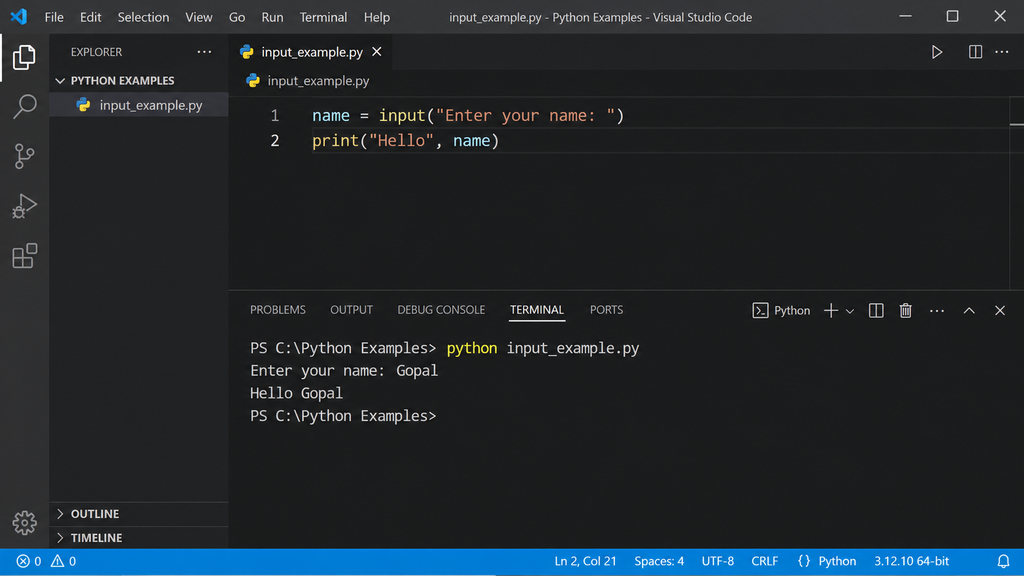
▶ 2. Your First Python input() Program
Let’s write our first interactive Python program. 😊
This program will ask the user to enter their name and then display a greeting.
🔍 How does this program work?
1.
Python displays the message
"Enter your name: "
on the screen.
2. The program waits for the user to enter a name.
3.
The entered name is stored in the variable
name.
4.
The
print()
function then displays the greeting.
Hello Gopal
📌 Key Point
The value entered by the user is stored in
name,
and we can use that variable later in the program.
🚀 Try It Yourself
Run the program in VS Code and enter your own name. Try entering a different name each time you run the program.
🧩 3. Basic Syntax of input()
🔹 1. The simplest form
The simplest way to use input() is:
💬 2. Displaying a message to the user
We can place a message inside the parentheses to tell the user what to enter.
The text shown to the user is called a prompt.
⚙️ 3. General syntax
The general form of the function is:
🎯 Example
Here, the prompt asks the user to enter their age:
When the program runs, the user sees:
📌 Remember
The message inside
input()
is called the prompt. It helps the user understand what information the program is expecting.
🔍 4. Understanding the Prompt
Let’s take a closer look at this statement:
🧩 This statement has three important parts:
name
— Variable
input()
— Function
"Enter your name: "
— Prompt
👀 Think of it this way
Store the answer • Ask for input • Guide the user
📌 Key Point
The prompt
is simply a message that tells the user what information the program is expecting.
📦 5. Storing User Input in a Variable
Usually, we want to use the information entered by the user later in the program.
For this reason, we store the value returned by
input()
in a variable.
💡 The basic idea
The value entered by the user is stored in the variable.
🎯 Example
Let’s ask the user for their name and store it in a variable called
name.
🖥️ What happens when the program runs?
Suppose the user enters:
Python stores Gopal in the variable
name.
The second statement then uses that variable to display:
📌 Important Idea
The statement
name = input(...)
means that the value entered by the user is assigned to
name.
🔁 Using the variable again
Once the value is stored, we can use the variable multiple times later in the program.
Example output:
Hello Gopal
Welcome Gopal
Have a nice day, Gopal
🌟 Remember
User input
→ is received by
input()
→ and stored in a
variable
→ so it can be used later.
🔤 6. What Type of Value Does input() Return?
⭐ Important for beginners
One of the most important things to remember about
input()
is that it returns the user’s input as a string.
Let’s understand this with a simple example.
🖥️ Output
20
<class ‘str’>
🔍 What does str mean?
str
is short for string.
A string represents text in Python. Therefore, even though the user entered
20, input()
has returned it as text.
💡 Remember the difference
20
"20"
→ string
📌 Key Point
By default,
input()
always returns a string, even when the user enters a number.
int() and float() become useful.
🤔 7. Why Does This Matter?
Knowing that input() returns a string becomes very important when we want to perform calculations.
Suppose we write the following program:
👤 The user enters:
Enter second number: 20
💭 What might a beginner expect?
10 + 20 = 30
⚠️ But Python displays:
🔍 Why does this happen?
Because the values returned by
input()
are strings.
So Python actually sees:
🧩 What does + do with strings?
With strings, the + operator joins the pieces of text together. This is called string concatenation.
Text + Text → Text
💡 The important difference
"10" + "20" → "1020"
10 + 20 → 30
int() or float().
🔢 8. Taking Integer Input Using int()
In the previous section, we saw that
input()
returns the user’s input as a string.
If we want the input to be treated as a
whole number (integer),
we can use the int() function.
💡 Basic idea
Python first receives the input and then converts it into an integer.
🧮 Let’s solve the previous addition problem
This time, we will convert both inputs into integers before adding them.
👤 Suppose the user enters
Enter second number: 20
🔄 What does int() do?
String → Integer
🖥️ Output
Enter second number: 20
30
🎯 Why is the result 30?
The inputs are converted before the addition takes place:
📌 Remember
Use
int(input())
when you want to take a user’s input as a
whole number.
int()
is suitable for whole numbers such as
10, 25, 100.
For decimal values such as 10.5, we will use
float().
💰 9. Taking Decimal Input Using float()
What if the user needs to enter a number that contains a decimal point?
For example: 25.50
💡 Use float() for decimal numbers
The float()
function converts the user’s input into a
floating-point number.
🎯 Simple Example
Suppose the user enters:
Python converts 25.50 into a floating-point number and stores it in
price.
🔄 What happens to the input?
String → Floating-point number
🧮 Practical Example – Calculate a Total
We can combine float() and int()
when a program needs both decimal and whole-number input.
👤 Example input:
Enter quantity: 4
🖥️ Output
📌 When should you use int() or float()?
Use for whole numbers such as 10, 25, 100.
Use for decimal numbers such as 10.5, 25.50, 3.14.
🌟 Remember
Use float(input())
when the user needs to enter a decimal number.
🧩 10. Taking Different Types of Input
So far, we have learned how to take text, whole numbers, and decimal numbers. Let’s combine them in one small program.
The program below asks the user for a name, age, and height.
💡 Notice the three types of input
input()
int(input())
float(input())
💻 Python Code
🔍 What does each line do?
📝 name = input(...)
→ takes the user’s name as text.
🔢 age = int(input(...))
→ takes the age and converts it to an integer.
📏 height = float(input(...))
→ takes the height and converts it to a decimal number.
👤 Example
Suppose the user enters:
Enter your age: 25
Enter your height in metres: 1.72
🖥️ Output
Age: 25
Height: 1.72
📌 Main Takeaway
Python lets us combine different input types in the same program. Choose the appropriate conversion based on the kind of data you expect from the user.
input()
|
Whole number → int(input())
|
Decimal → float(input())
👋 11. Practical Example 1 – Greeting the User
Let’s create a simple interactive program that asks the user for their name and then displays a friendly greeting.
💻 Python Code
🔍 How it works
1. The program asks the user to enter their name.
2.
The entered name is stored in the variable
name.
3. The program uses that variable to display a personalized greeting.
👤 Example
🖥️ Output
Welcome to Python!
🌟 What did we learn?
We used input()
to receive the user’s name and stored the result in a variable.
The variable was then reused with print()
to create a personalized message.
🚀 Try It Yourself
Change the program so that it also asks for the user’s favorite programming language and displays it in the greeting.
➕ 12. Practical Example 2 – Add Two Numbers
Let’s create a simple program that takes two numbers from the user and calculates their sum.
💻 Python Code
🔍 How does the program work?
1.
int(input())
takes the first number and converts it to an integer.
2.
The second number is taken in the same way and stored in
b.
3.
The statement
sum = a + b
adds the two numbers.
4.
Finally,
print()
displays the result.
👤 Example
Suppose the user enters:
Enter second number: 15
🧮 Calculation
🖥️ Output
📌 Key Point
Since input()
returns a string, we use
int()
to convert the user’s input into whole numbers before performing the addition.
🚀 Try It Yourself
Change the program so that it takes three numbers and calculates their total.
🧠 13. A Useful Rule to Remember
⭐ Before using input(), ask yourself:
📝 If it is text
➜ Use plain input() when you want text.
🔢 If it is a whole number
➜ Use int(input()) for whole numbers such as 18, 25, or 100.
📏 If it is a decimal number
➜ Use float(input()) for decimal numbers such as 25.50 or 3.14.
⚡ Quick Decision Guide
input()
int(input())
float(input())
🌟 Remember This Simple Rule
Choose the conversion based on the type of data you expect.
This simple habit will help you avoid many common beginner mistakes when working with
input().
🏁 14. Complete Example
Let’s bring together several concepts we have learned in this tutorial and create one simple interactive program.
This program collects a student’s name, age, and favorite subject and then displays the information neatly.
💻 Python Code
🧩 What concepts are used here?
input()
int(input())
name, age
print()
👤 Example Input
Enter your age: 20
Enter your favorite subject: Computer Science
🖥️ Output
Name: Gopal
Age: 20
Favorite Subject: Computer Science
🔄 Program Flow
🌟 What did we learn?
This small program combines several important Python concepts: taking input, converting input, storing values in variables, and displaying the results.
🚀 Beginner Challenge
Modify the program to also ask for the student’s school name and display it in the Student Information section.
⚖️ 15. input() vs print()
Beginners often learn print() and input() together.
Although both are built-in Python functions, they have different purposes.
🔍 The Basic Difference
| Function | Purpose |
|---|---|
print()
|
🖥️ Displays information on to the screen |
input()
|
⌨️ Receives information from the user |
🧠 Easy way to remember
Gets information from the user.
Sends information to the user.
💻 Example
🔄 What happens here?
1. input() asks the user to enter information.
2. name stores the value entered by the user.
3. print() displays a message containing that value.
🔁 Think of them as two parts of an interaction
📌 Quick Revision
input()
takes information in,
while
print()
shows information out.