Python Keywords – Beginner’s Guide with Examples
💡 1. Introduction
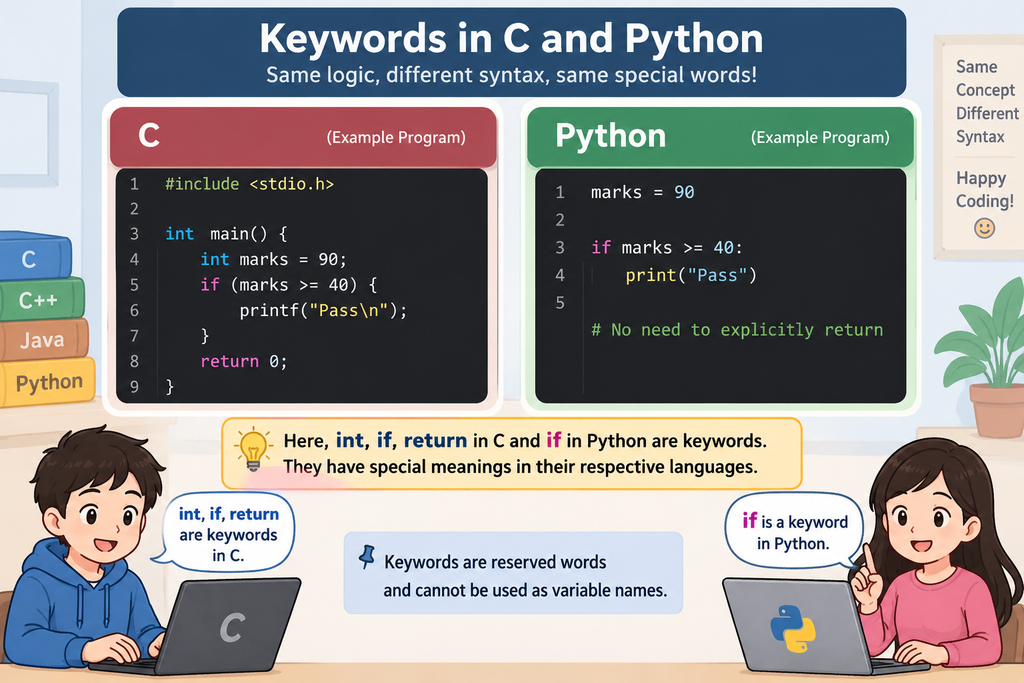
When you learn C programming, you come across words such as
int,
if,
else,
while,
return,
and
void.
These words have a predefined meaning in the C language and cannot
normally be used as variable names.
🐍 Python also has such special words. They are called keywords.
In this tutorial, we will learn what Python keywords are, why they are important, how to find them, and how Python keywords compare with keywords in C, C++ and Java.
2. What Is a Keyword?
A keyword is one of the major building blocks of a programming language.
📌 In simple language:
🐍 For Python:
else
for
while
def
class
return
import
These words are reserved for specific purposes.
💡 For example:
print ( “Eligible” )
🔎 Here:
-
if→ Python keyword -
age→ identifier -
18→ integer literal -
print→ built-in function -
>=→ operator
3. Python Keywords vs Identifiers
Many beginners confuse keywords and identifiers. Understanding the difference is important when writing Python programs.
🔑 Keyword
A keyword is a reserved word that has a predefined meaning in Python. You cannot normally use a keyword as the name of a variable, function, or class.
Examples:
else
for
while
def
class
return
🏷️ Identifier
An identifier is a name given by the programmer to identify variables, functions, classes, and other objects.
Examples:
student_name
marks
total
calculate_sum
A keyword is defined by Python, while an identifier is a name chosen by the programmer.
📘 Quick Comparison
Defined by Python
Chosen by the programmer
💻 Let’s understand this with a simple example:
if student_name:
print ( student_name )
📋 Now let’s identify each part:
| Word / Symbol | What is it? |
|---|---|
student_name
|
Identifier |
if
|
Keyword |
print
|
Built-in function |
"Rahul"
|
String |
=
|
Assignment operator |
Learning to identify keywords, identifiers, functions, values, and operators will make it much easier to understand Python programs.
4. Can a Python Keyword Be Used as a Variable Name?
❌ Incorrect example:
❌ Python produces a SyntaxError because
if
is a Python keyword.
❌ Another invalid example:
❌ Again, this is invalid because
class
is also a reserved Python keyword.
✅ Use a normal identifier instead:
✅ Valid.
student
is an identifier chosen by the programmer.
Python keywords are reserved for special purposes, so they cannot be used as variable names, function names, or class names.
5. How Many Keywords Does Python Have?
The number of Python keywords can depend on the Python version you are using. Therefore, it is better not to memorize a fixed number.
Instead, Python provides a simple way to find the keywords supported by the version installed on your computer.
🐍 Use the following code:
print ( keyword . kwlist )
The keyword module provides information about
Python’s reserved keywords. The
kwlist attribute gives the list of keywords
supported by your Python installation.
🔢 Want to know how many keywords there are?
print ( len ( keyword . kwlist ))
print ( keyword . kwlist )
The first line displays the number of keywords, while the second line displays the complete list of keywords available in your Python installation.
Don’t simply memorize the number of Python keywords.
Let Python tell you! The
keyword
module lets you check the keywords supported by the Python
version you are actually using.
6. How to Check Whether a Word Is a Python Keyword
Python provides an easy way to check whether a particular word is a keyword.
The
keyword.iskeyword()
function.
🧩 Basic syntax:
💡 Example:
print ( keyword . iskeyword ( “if” ))
print ( keyword . iskeyword ( “hello” ))
📤 Output:
False
"if"
→ Python keyword
"hello"
→ Not a Python keyword
The
iskeyword()
function returns True if the word is a Python
keyword and False otherwise.
7. Python Keywords vs C Keywords
🧠 If you have learned C before learning Python, comparing the two languages can make Python keywords much easier to understand.
Instead of merely comparing the number of keywords, let’s compare how the two languages use keywords.
📋 For example:
| Purpose | C | Python |
|---|---|---|
| Condition |
if
else
|
if
elif
else
|
| Loop |
for
while
|
for
while
|
| Function | — (no keyword) |
def
|
| Return |
return
|
return
|
| Structure / Class |
struct
|
class
|
| Boolean |
_Bool
/ conventions
|
True
False
|
| Null-like value |
NULL
convention
|
None
|
| Import |
#include
directive
|
import
from
|
| Exception handling | — (no built-in exception keywords) |
try
except
finally
|
In C, _Bool
is a keyword, while
NULL
is not a keyword. It is a null-pointer
macro/convention provided by C implementations and libraries.
Similarly, #include
is a preprocessor directive, not a C keyword.
C and Python use keywords for many of the same programming
concepts, but the syntax and the set of keywords are different.
For example, Python uses def
to define a function, whereas C does not have a special
function-definition keyword.
8. Python vs C++ Keywords
🔄 If you already know C++, comparing C++ and Python can help you quickly understand how Python expresses common programming concepts.
📋 Let’s compare them:
| Concept | C++ | Python |
|---|---|---|
| Class |
class
|
class
|
| Function definition | Return type + function syntax |
def
|
| Object creation |
new
|
Usually no new keyword
|
| Inheritance |
:
|
class Child(Parent):
|
| Exception handling |
try
catch
throw
|
try
except
raise
|
| Boolean |
true
false
|
True
False
|
| Null value |
nullptr
|
None
|
| Namespace / organization |
namespace
|
Modules / packages |
C++ and Python often use different keywords and syntax to
express similar programming ideas.
For example, C++ uses
try,
catch,
and
throw,
while Python uses
try,
except,
and
raise.
Don’t try to translate every C++ keyword directly into Python. Instead, look for the programming concept and then learn how Python expresses that concept.
9. Python vs Java Keywords
☕ If you have learned Java, comparing Java and Python can help you understand how Python expresses familiar programming concepts.
📋 Let’s compare them:
| Concept | Java | Python |
|---|---|---|
| Class |
class
|
class
|
| Function / method | Return type + method syntax |
def
|
| Inheritance |
extends
|
Class parentheses |
| Exception handling |
try
catch
finally
|
try
except
finally
|
| Object creation |
new
|
No new keyword
|
| Boolean |
true
false
|
True
False
|
| Null value |
null
|
None
|
| Interface |
interface
|
No equivalent keyword |
| Package / module organization |
package
|
Packages / modules |
Java and Python may use different syntax and keywords to express
similar programming concepts. For example, Java uses
extends
for class inheritance, while Python specifies the parent class
inside parentheses.
You will recognize many familiar programming ideas in Python, but the way they are written can be much simpler. Focus on the concept first and then learn Python’s way of expressing it.
10. A Very Important Section: Keyword vs Built-in Function
Beginners frequently think that words such as
print,
input,
and
len
are Python keywords.
They aren’t.
🔎 Consider these familiar Python words:
input
len
type
📋 Let’s classify them correctly:
| Word | Keyword? | What is it? |
|---|---|---|
if
|
✓ Yes | Python keyword |
for
|
✓ Yes | Python keyword |
def
|
✓ Yes | Python keyword |
print()
|
✕ No | Built-in function |
input()
|
✕ No | Built-in function |
len()
|
✕ No | Built-in function |
type()
|
✕ No | Built-in function |
🧪 You can verify this yourself:
print ( keyword . iskeyword ( “print” ))
📤 Output:
print
is not a Python keyword. It is a
built-in function that is available automatically
in Python.
Keywords are reserved words that form part of Python’s syntax. Built-in functions are predefined functions that perform useful operations.
For example:
if
is a keyword, while
print()
is a built-in function.
11. 🕵️ Keyword Detective Exercise
Read the following Python program carefully and try to identify all the Python keywords before looking at the answer.
💻 Study the code:
if student:
print ( student )
for i in range ( 3 ):
print ( i )
🔎 Can you identify the Python keywords?
Look through the program and write down the words you think are Python keywords. Then compare your answer below.
✅ Reveal the answer:
= → operator
if → keyword
print → built-in function
for → keyword
i → identifier
in → keyword
range → built-in function
if,
for,
and
in.
A Python program contains many different types of elements. Not every word you see is a keyword. Some are identifiers, some are built-in functions, and others are operators.
Learning to recognize these differences is an important step toward reading Python programs confidently.
12. 🧪 Practical Exercise
The following small program checks several words and tells us whether each one is a Python keyword.
💻 Try this program:
words = [ “if”, “hello”, “for”, “student”, “while”, “print” ]
for word in words:
print ( word, keyword . iskeyword ( word ))
📤 Output:
hello False
for True
student False
while True
print False
The program goes through each word in the list and passes it
to keyword.iskeyword().
If the word is a Python keyword, the function returns True. Otherwise, it returns False.
🔍 This small program demonstrates:
-
import→ importing a module -
for→ repeating an operation for each item -
in→ working with items in a sequence -
keyword.iskeyword()→ checking whether a word is a keyword
Try replacing the words in the list with other words such as
class,
return,
apple,
or
number.
Run the program and see which ones return
True.
13. 📝 Quick Revision
Before you finish, let’s quickly review the most important ideas about Python keywords.
keyword.kwlist
to see Python’s keyword list.
keyword.iskeyword()
to check whether a word is a keyword.
print(),
input(),
len(),
and
type()
are not keywords.
True,
False,
and
None
are Python keywords.