Python Data Types Explained with Examples – A Beginner’s Guide
🐍 1. Introduction
💻 Every Python program works with data. This data may be a number, a piece of text, a collection of values, or even a simple True or False value.
🔎 Python uses data types to tell us what kind of value we are working with.
🌍 A Simple Real-World Example
Think about the information we use in everyday life. A person’s age is a whole number, height may contain a decimal value, and a person’s name is text.
| 📋 Example Data | 🧩 Python Data Type |
|---|---|
| 🎂 Age → 20 | int |
| 📏 Height → 5.8 | float |
| 👤 Name → “Rahul” | str |
| ✅ Passed → True | bool |
| 📚 Subjects → [“Python”, “C”, “Java”] | list |
🐍 How Does This Look in Python?
✏️ We can store these values in variables:
height = 5.8
name = “Rahul”
passed = True
⭐ Why Should We Learn Data Types?
Data types are important because different types of data behave differently in a Python program.
➕ For example, adding two numbers performs arithmetic, while joining two strings combines text.
🚀 In the following sections, we will explore the most commonly used Python data types with simple explanations, examples, and programs.
🧩 2. What is a Data Type?
Before learning the different Python data types, let’s understand what a data type actually means.
A data type tells Python what kind of value is stored in a variable. For example, 20 is a whole number, 5.8 is a decimal number, and “Rahul” is text.
🐍 Let’s Look at an Example
Consider the following Python variables:
name = “Rahul”
height = 5.8
passed = True
🔍 Each variable contains a different kind of value:
- 20 → an integer (int)
- “Rahul” → a string (str)
- 5.8 → a floating-point number (float)
- True → a Boolean value (bool)
🔎 How Can We Find the Data Type?
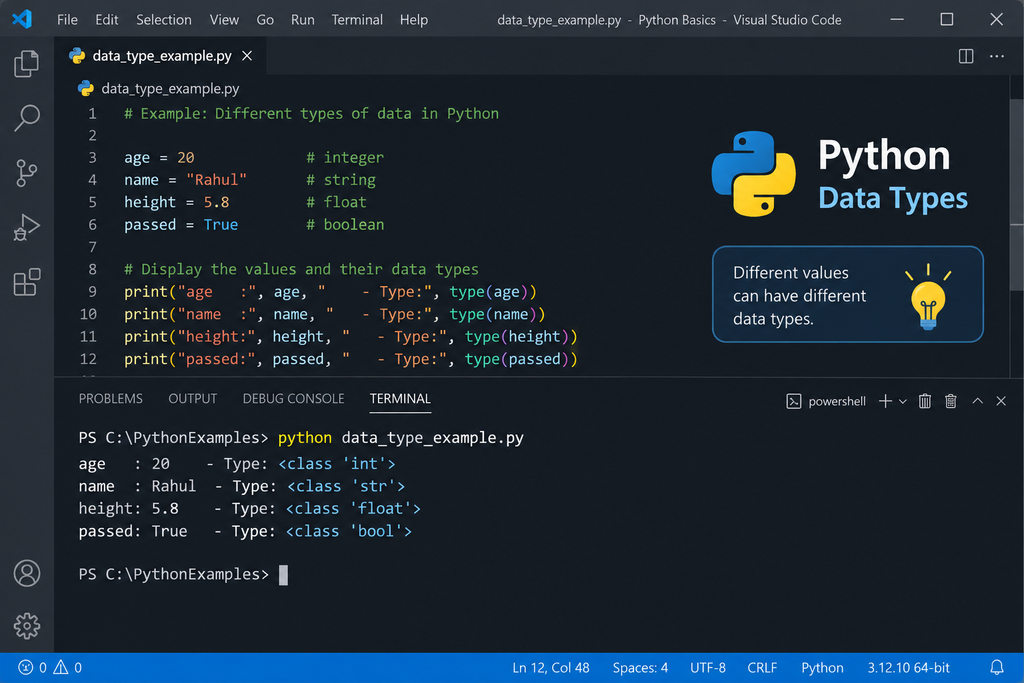
Python provides a built-in function called type(). It tells us the data type of a value or variable.
📤 Output:
🎯 The output <class ‘int’> tells us that the variable age contains an integer value.
🚀 Now that we understand what a data type is, let’s explore the different built-in data types available in Python.
🧩 3. Main Built-in Data Types in Python
🐍 Python provides several built-in data types for storing and working with different kinds of information.
Before learning each type in detail, let’s get a quick overview of the most commonly used ones.
| 📂 Category | 🧩 Data Type | ✏️ Example | 🎯 Mainly Used For |
|---|---|---|---|
| 🔢 Numeric | int |
25
|
Whole numbers |
| 🔢 Numeric | float |
25.5
|
Decimal numbers |
| 🔢 Numeric | complex |
2 + 3j
|
Complex numbers |
| ✅ Boolean | bool |
True
|
True / False |
| 🔤 Text | str |
"Python"
|
Text and characters |
| 📚 Sequence | list |
[10, 20, 30]
|
Ordered collection |
| 📚 Sequence | tuple |
(10, 20, 30)
|
Ordered, fixed collection |
| 🎯 Set | set |
{10, 20, 30}
|
Unique values |
| 🗂️ Mapping | dict |
{"name": "John"}
|
Key-value data |
| ⚪ Special | NoneType |
None
|
Represents no value |
🗺️ What We Will Learn
We will begin with simple data types such as int, float, bool, and str, and then move on to collections such as list, tuple, set, and dict.
🚀 Let’s start with the simplest numeric data type: integers (int).
🔎 4. The type() Function
When learning Python, you may sometimes wonder: “What type of data is stored in this variable?”
Python provides a simple built-in function called type() to answer this question.
🐍 Example
Let’s create variables containing different types of data:
height = 5.8
name = “Python”
passed = True
print ( type ( age ))
print ( type ( height ))
print ( type ( name ))
print ( type ( passed ))
📤 Output:
<class ‘float’>
<class ‘str’>
<class ‘bool’>
🧠 Understanding the Output
Each line of the output tells us the data type of the corresponding variable:
🔤 name → str | ✅ passed → bool
✏️ Basic Syntax
🔄 5. Python Automatically Determines the Data Type
🐍 One of the useful features of Python is that you do not have to specify the data type when creating a variable.
Python looks at the value assigned to the variable and automatically determines its data type.
💻 See It in Action
Look at what happens when we assign different values to the same variable:
print ( type ( x ))
x = “Python”
print ( type ( x ))
x = 10.5
print ( type ( x ))
📤 Output:
<class ‘str’>
<class ‘float’>
🧠 What Happened Here?
The variable x was used three times, but each time it referred to a different type of value.
🔤 x = “Python” → x refers to a str
🔢 x = 10.5 → x refers to a float
🚀 This Feature is Called Dynamic Typing
Python is known as a dynamically typed language. This means a variable can refer to values of different data types during the execution of a program.
🎯 Key idea: Python determines the type from the value, and type() lets you check that type.
🔄 6. Type Conversion
🔁 Sometimes we need to change a value from one data type to another. This process is called type conversion.
Python provides built-in functions such as int(), float(), and str() to perform common conversions.
🔢 1. Convert to Integer — int()
The int() function can convert a suitable value into an integer.
age = int ( age )
print ( age )
print ( type ( age ))
📤 Output:
<class ‘int’>
🔢 2. Convert to Float — float()
The float() function converts a suitable value into a floating-point number.
y = float ( x )
print ( y )
print ( type ( y ))
📤 Output:
<class ‘float’>
🔤 3. Convert to String — str()
The str() function converts a value into a string.
text = str ( number )
print ( text )
print ( type ( text ))
📤 Output:
<class ‘str’>
int() → converts to an integer
float() → converts to a floating-point number
str() → converts to a string
🎯 A Practical Example with input()
One of the most common situations where type conversion is needed is when taking input from the user.
print ( age )
print ( type ( age ))
📊 7. Quick Comparison of Python Data Types
🔍 We have now explored the main Python data types. The table below brings them together in one convenient reference.
| 📂 Category | 🧩 Data Type | ✏️ Example | 🎯 Commonly Used For |
|---|---|---|---|
| 🔢 Numeric | int |
25
|
Whole numbers |
| 🔢 Numeric | float |
25.5
|
Decimal numbers |
| 🔢 Numeric | complex |
2 + 3j
|
Complex numbers |
| ✅ Boolean | bool |
True
|
True / False decisions |
| 🔤 Text | str |
"Hello"
|
Text |
| 📚 Sequence | list |
[1, 2, 3]
|
Collection of items |
| 📚 Sequence | tuple |
(1, 2, 3)
|
Fixed collection |
| 🎯 Set | set |
{1, 2, 3}
|
Unique items |
| 🗂️ Mapping | dict |
{"a": 1}
|
Key-value data |
| ⚪ Special | NoneType |
None
|
Represents no value |
🚀 Now let’s put what we have learned into practice with a small Python program.
📝 8. Small Practice Exercises
💻 Now it’s your turn! Try these small exercises to check how well you understand Python data types.
🎯 Exercise 1 — Create Variables
Create variables to store the following information:
- 👤 Your name
- 🎂 Your age
- 📏 Your height
- 🎓 Whether you are a student
🔎 Print each value and use type() to display its data type.
📚 Exercise 2 — Identify a List
Create the following list:
🔎 Print the list and use type() to verify its data type.
🗂️ Exercise 3 — Create a Dictionary
Create a dictionary containing these three pieces of information:
age
course
🔎 Print the dictionary and check its data type using type().
🔄 Exercise 4 — Input and Type Conversion
Ask the user to enter two numbers. Convert both inputs into integers and calculate their sum.
⭐ Bonus: Print the result and its data type.
🎉 Don’t worry if your first attempt doesn’t work perfectly. Read the error, make a small change, and try again!
✅ Solutions to the Practice Exercises
🔍 Finished the exercises? Let’s check your solutions. The following examples show one possible way to solve each problem.
🎯 Exercise 1 — Solution
Create variables for your name, age, height, and student status, then display their values and data types.
age = 20
height = 5.8
is_student = True
print ( name , type ( name ))
print ( age , type ( age ))
print ( height , type ( height ))
print ( is_student , type ( is_student ))
📚 Exercise 2 — Solution
Create a list and check its data type.
print ( numbers )
print ( type ( numbers ))
<class ‘list’>
🗂️ Exercise 3 — Solution
Create a dictionary containing a name, age, and course.
“name” : “Rahul” ,
“age” : 20 ,
“course” : “Python”
}
print ( student )
print ( type ( student ))
<class ‘dict’>
🔄 Exercise 4 — Solution
Ask the user for two numbers, convert them to integers, and calculate their sum.
num2 = int ( input ( “Enter second number: “ ))
total = num1 + num2
print ( “Sum =” , total )
print ( type ( total ))
📤 Sample Output:
Enter second number: 20
Sum = 30
<class ‘int’>
💡 The actual result will depend on the numbers entered by the user.
🚀 Mini Challenge — One Possible Solution
Here’s one program that uses several different Python data types and displays the type of each value.
height = 5.8
name = “Rahul”
passed = True
subjects = [ “Python” , “C” , “Java” ]
student = { “name” : “Rahul” }
print ( type ( age ))
print ( type ( height ))
print ( type ( name ))
print ( type ( passed ))
print ( type ( subjects ))
print ( type ( student ))
<class ‘float’>
<class ‘str’>
<class ‘bool’>
<class ‘list’>
<class ‘dict’>